Strategies and Technologies
By Amber Foster, Assistant (Teaching) Professor of Writing, The Writing Program – March 2, 2021
For many faculty, videos are an indispensable vehicle for course content. Lectures, films, TED Talks, and other recordings are a staple of both face-to-face and online instruction, not to mention a convenient means of introducing or reinforcing course content. Yet videos don’t have to be a passive learning experience for students. With the rise of hybrid, online, and technology-mediated instruction in higher education, demand for more active ways to engage with video content has led to the emergence of a host of innovative educational technologies. Below, I share a few approaches and online tools that can make video-watching more interactive. Even better, all have a low bar for entry, meaning you don’t have to own high-end equipment or be especially tech-savvy to make them work.
1. Build Quizzes into your Videos
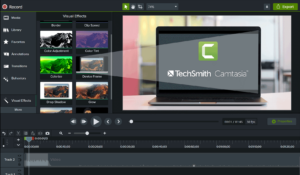
Interactive quizzes ask students to pause at any point in a video, reflect on what they’ve learned so far, and answer a multiple-choice question. This is a common technique for asynchronous-only courses, as it helps students to retrain key information; in most cases, the question must be answered for the video to continue playing.
In my experience, Camtasia is one of the more user-friendly options for this, although it requires a license (30-day free trial, then a one-time fee of $169 for educators). The videos can only played using the Camtasia Smart Player, but the player can be easily uploaded and integrated into any content area on Blackboard, using the SCORM content package link:

Although there is a learning curve for Camtasia, it’ designed with educators in mind, with cut-and-paste, drag-and-drop tools reminiscent of word processing programs. It can also generate captions to keep your course content ADA compliant. Quizzes can be taken anonymously or scored, with the results emailed to the instructor or teaching assistant. Here is Camtasia’s step by step tutorial for integrating quizzes.
Similar video tools include:
Playposit ($144/year; also supports Blackboard integration)
EdPuzzle ($11/month for pro version; allows you to build course quizzes into YouTube, TED, and other Internet-hosted videos)
TedEd (Free; works with a library of Ted Talks and YouTube only)
Mindstamp (Pricing varies, with educational discounts available; in addition to quizzes, provides other tools such as buttons, hotspots, and drawing)
2. Try Collaborative Video Annotation

Much like text-based annotation tools such as Hypothes.is or Perusall, video annotation tools allow students to pause a video, create an annotation, and respond to the annotations of others. Students thus become more engaged with the video content (and their peers, as an added bonus).
For example, Vialogues is a free service that allows instructors to create time-stamped surveys, comments, and multiple-choice questions to an uploaded instructional video or video link (YouTube/Vimeo). Students can then reply to instructor comments. Vialogues can also be embedded on any site supporting HTML editing, including Blackboard.
Likewise, the University of Minnesota’s VideoAnt is web-based software for annotating an online video (uploaded files or YouTube). Students can build on instructor annotations by replying, or create annotations of their own as part of an individual or group assignment.
To have even more fun, VoiceThread allows text, audio, or video comments ($99/year for up to 50 students and one instructor, with other pricing options available).
3. Host a Watch Party

Since the outbreak of the pandemic, more and more streaming services offer some kind of “watch party” feature, which groups to watch a film or television show simultaneously from an Internet browser. A chat window allows for free communication during the stream. Amazon’s Prime Video Watch Party, for example, allows up to 100 attendees; Netflix’s Teleparty allows up to 50.
There are some major drawbacks with using these services for education, however: subscriptions are required to access most streaming services, and not all content will be available outside the United States. Amazon has the edge in this regard, since watch parties are possible for any video rental not exclusive to Prime members.
Of course, the simplest approach is for the instructor to host their own watch party with Zoom. That way, Zoom chat or Slack can be a way to discuss the film while it is playing. This also makes it easier for the instructor to pause the video, ask a question, or start a discussion. Technical issues (such as lagging) can occur with slower Internet connection speeds, but keep in mind that most streaming sites allow playback in lower-resolutions for reduced data usage.
4. Flip the Classroom
If you really want to teach outside the box, many of the tools described above can be adapted to a flipped classroom model. For example, you might have students submit video responses to course content or annotate each other’s videos. As a more instructor-guided approach, students can record short video responses to specific questions or course content (à la TikTok), using the free platform Flipgrid.
—
As a final thought, it’s usually worth it to pay for a licensed program, especially if videos are a staple of your pedagogy. Software with one-time fees such as Camtasia are a good bet, since they are more affordable long term, and they offer more technical support. Nearly all of the tools listed above have free trials that allow you to test the technological waters before you wade in. No matter what digital tool you ultimately decide to use, the key is to transform the act of pressing “play” from a passive to an active learning experience. In this way, course videos can be a means to increase student engagement and facilitate even more meaningful interactions between instructors, peers, and video content.